Making My Own Fortune Collection Using Go
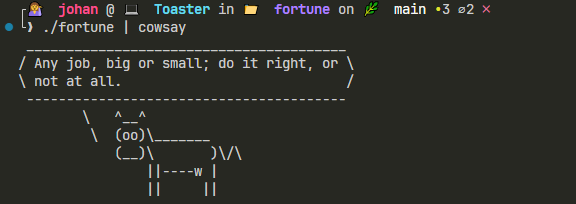
Everyone loves a good Cowsay. I enjoy opening my terminal and being greeted by my favorite little ASCII cow, spouting some random quote.
But the quotes never make any sense! They’re not funny, they’re not insightful – honestly, they’re barely coherent.
When the cow catches the eyes of my coworkers, they usually ask,
“What is that?”
And I say,
“It’s a cow. Every time I open my terminal, he greets me with a random quote.”
“Awesome! Let’s read the quote!” they reply. Our reaction to the quote:

The random quotes come from something called a fortune – a classic Unix program that dates back to the 1970s. I installed it the easy way using Homebrew: brew install fortune
But I wanted custom fortunes. Ones I enjoy. Ones I collect over time. Like Pokémon.
Sure, I could’ve just downloaded the collection from JKirchartz’s repo, pointed the script to that folder, and called it a day. But where’s the fun in that? I wanted to write my own script: something that could randomly select a file of fortunes, read its contents, split it by %, and return a random one. I got this logic from the Wiki. #credible
I could’ve done it in a language I know and love, like Python. But I didn’t.
Lately, I’ve been exploring other languages like Go, and frankly, I was in desperate need of a project to help me learn. This little fortune project? It was the perfect fit.
🔵 Building my own fortune using Go
My main idea is to have a fortunes directory in the same path as the script. This directory will contain a bunch of text files with all my fortunes.
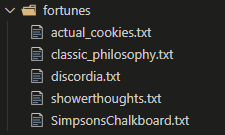
The first step is to write something that ensures this folder exists. In the main() function, I do this by calling my own dirExists function:
func dirExists(path string) (bool, error) {
	if _, err := os.Stat(path); err == nil {
		return true, nil
	} else if os.IsNotExist(err) {
		return false, nil
	} else {
		return false, err
	}
}

func main() {
	// DECLARE SOME VARIABLES
	FORTUNE_COLLECTION_DIR := "fortunes"

	// ====> CHECK TO MAKE SURE THE FORTUNE DIRECORY EXISTS
	if exists, err := dirExists(FORTUNE_COLLECTION_DIR); err != nil {
		log.Fatal(err)
	} else if !exists {
		log.Fatal("Could not find your fortune directory")
	}
}
Go has a very interesting mechanic for handling errors. Most functions return the result you want and an err. You then evaluate the error and decide whether to panic and exit the program. You can either log it with log.Fatal, or panic with panic(). Yes, that function exists. I mostly use log.Fatal since it includes a timestamp. panic() seems more verbose.
So I stuck to this pattern when creating the dirExists function.
Right. We checked if the folder exists. Next step is to list all the fortune files and to choose a random *.txt file:
fortuneFiles := listFortuneFiles(FORTUNE_COLLECTION_DIR)
fortuneFile := chooseRandomElement(fortuneFiles)
Here’s how listFortuneFiles works:
func listFortuneFiles(path string) []string {
	var fortuneFiles []string

	items, err := os.ReadDir(path)
	if err != nil {
		log.Fatal(err)
	}
	for _, item := range items {
		if !item.IsDir() && strings.HasSuffix(item.Name(), ".txt") {
			fortuneFiles = append(fortuneFiles, item.Name())
		}
	}
	return fortuneFiles
}
Here, I tried something different. Instead of returning the error, I handle it inside the function — similar to how many Python functions behave. Just playing around with different design patterns.
This function loops over the items returned by os.ReadDir, filters out anything that’s not a .txt file, and appends valid files to a fortuneFiles slice.
Oh, and one more thing: all functions in this main package are private. How can you tell? In Go, a function is private if it starts with a lowercase letter. If I had named it ListFortuneFiles, it would’ve been public. Since I’m not exporting anything, this doesn’t matter — but it’s an interesting mechanic.
After we get our slice of strings, we need to choose a random one. In Go, there is no random.choice(list) function like in Python. Or maybe there is. I’m new to this. Anyway. Let’s make our own one called chooseRandomElement
func chooseRandomElement(slice []string) string {
	return slice[rand.Intn(len(slice))]
}
It’s really simple. It takes a slice of strings and gets the index of one of the slices based on a random integer derived from the length of the slice.
Now for the juicy part. Reading in the fortunes from the fortunes file.
fortunes := readFortunes(filepath.Join(FORTUNE_COLLECTION_DIR, fortuneFile))
I like using filepath.Join to build paths – it’s the safest, most portable way to do it. I was thrilled to find that Go has this built-in.
So readFortunes looks something like this:
func readFortunes(path string) []string {
	var (
		fortunes []string
		chunk    []string
	)

	rawFile, err := os.ReadFile(path)
	if err != nil {
		log.Fatal(err)
	}

	// Damn Windows
	rawFileString := strings.ReplaceAll(string(rawFile), "\r\n", "\n")

	lines := strings.Split(rawFileString, "\n")

	for _, line := range lines {
		if strings.TrimSpace(line) == "%" {
			// To account for a % at the top with no content above it
			if len(chunk) > 0 {
				// Rebuild the par and add to the final slice
				fortunes = append(fortunes, strings.Join(chunk, "\n"))

				// reset
				chunk = []string{}
			}
		} else {
			// we're still building the chunk
			chunk = append(chunk, line)
		}
	}

	// account for if there is no % at the very end of the file
	if len(chunk) > 0 {
		fortunes = append(fortunes, strings.Join(chunk, "\n"))
	}
	return fortunes
}
Why all this logic? It has to do with an important mechanic behind fortunes. When you open a “classic” fortune file, it will look like this:
%
Fortune text goes here.
  - by Happybread
%
Another fortune text goes here.

And this is the end
%
The separator in a fortune file is a lone % character. When we pick a fortune, it must preserve the newlines of the fortune:
Fortune text goes here.
  - by Happybread
Some files start with %, some don’t. Some end with %, some don’t. So I wrote readFortunes to account for that.
The function builds fortunes by appending lines into a chunk slice until it hits a % separator. When it does, it joins the chunk with newlines and appends it to the fortunes slice, then resets the chunk. The final check for len(chunk) > 0 ensures the last fortune is included even if the file doesn’t end with %.
Once we’ve read the fortunes, we pick one at random:
fortune := chooseRandomElement(fortunes)
fmt.Println(fortune)
🐈 Building a GitHub Action to build the binary
I want other people to use my script as well. I want them to download it and run it on any operating system they want. Oh! Wait! Go is a compiled language. But if I compile it in WSL, can someone using Windows use my script? Yes!
To build for Windows, you can run
GOOS=windows GOARCH=amd64 go build -o bin/fortune.exe fortune.go
To build for Linux, you can run
GOOS=linux GOARCH=amd64 go build -o bin/fortune fortune.go
Great! Now I want this build to run every time I push to main. Luckily, GitHub actions can do this for us! We add an action into our .github folder and configure something like this:
on:
  push:
    branches:
      - main  # Runs on every push to main
Then we can very quickly get Go installed onto our job:
jobs:
  build:
    runs-on: ubuntu-latest

    steps:
      - name: Checkout code
        uses: actions/checkout@v4

      - name: Set up Go
        uses: actions/setup-go@v5
        with:
          go-version: '1.23'
then we can create a /bin folder and build both binaries and save the output to this directory
  - name: Set a build directory
	run: mkdir -p bin
  - name: Build Linux binary
	run: |
	  GOOS=linux GOARCH=amd64 go build -o bin/fortune fortune.go
  - name: Build Windows binary
	run: |
	  GOOS=windows GOARCH=amd64 go build -o bin/fortune.exe fortune.go
Lastly, we can save the output as a GitHub release:
      - name: Delete existing latest tag if exists
        run: |
          git tag -d latest || true
          git push origin :refs/tags/latest || true

      - name: Create latest tag
        run: |
          git config user.name "github-actions"
          git config user.email "[email protected]"
          git tag latest
          git push origin latest

      - name: Create Release
        uses: softprops/action-gh-release@v2
        with:
          tag_name: latest
          name: "Latest Release"
          draft: false
          prerelease: false
          files: |
            bin/*
        env:
          GITHUB_TOKEN: ${{ secrets.GITHUB_TOKEN }}
🚢 Deploying to Production
To get the Cowsay when your terminal starts, add the fortune binary and fortunes folder to your $HOME directory. Then open your .bashrc file and add the following to the file:
talk(){
  ./fortune | cowsay
}
talk
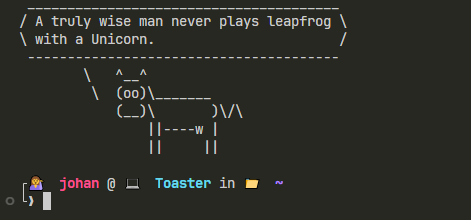
If you’re on Windows, use ./fortune.exe instead. Then restart your terminal and now you should see:
Now to the last step… growing my collection!
If you want to have a look at my source code, go visit the repo: github.com/Johandielangman/fortunes